
Formulexa

Discount Calculator

A discount calculator finds the sale price and amount saved from an original price and discount. This tool also lets you work backward from a sale price, combine sequential discounts correctly, use fixed-amount coupons, compare two offers, and optionally estimate tax using a rate you enter. Stacked discounts are applied one after another rather than simply added.

Discount Calculator: Calculate sale price, savings, percent off, and compare deals.

Formatting only; no currency conversion.

The price before any discounts.

Discounts

What this discount calculator can calculate

  • Final sale price: Discover what you will pay after a markdown.
  • Amount saved: See the exact dollar value of your savings.
  • Discount percentage: Find the percent off if you know the original and sale prices.
  • Original price: Work backward from a sale price and percentage to find the original tag.
  • Stacked discounts: Accurately calculate multiple sequential discounts (e.g., 20% off plus an extra 10% off).
  • Fixed coupons: Apply fixed-amount coupons.
  • Optional estimated tax: Estimate the final checkout total by adding your local sales tax rate to the discounted price.
  • Compare deals: Evaluate two different offers side-by-side to find the better deal.

Why stacked discounts do not add

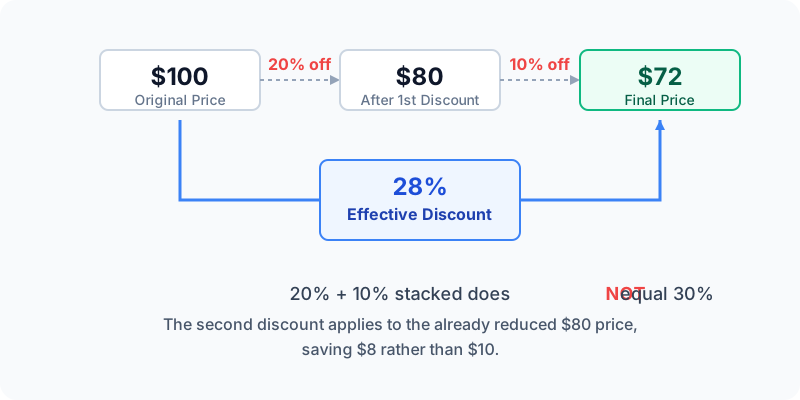
When you stack discounts, the second discount applies to the newly reduced price, not the original price. Adding 20% + 10% does not equal a 30% discount.

Diagram showing that 20% followed by 10% stacked on $100 results in $72, an effective discount of 28%.
A 20% discount on $100 leaves $80. A 10% discount on that $80 saves $8, bringing the total to $72 (an effective 28% discount).

Percentage discount vs fixed amount coupon

Which saves more: a percentage off (e.g., 20%) or a fixed-amount coupon (e.g., $15)? It depends on the item's original price. For lower-priced items, a fixed-amount coupon often saves more. For higher-priced items, a percentage discount usually yields greater savings.

Discount and sales tax

Tax treatment of coupons, rebates, and products varies by jurisdiction. This option applies the rate you enter to the post-discount amount as a simple estimate. We cannot infer or promise exact checkout taxes based purely on a simple rate.

How to compare two deals

You can use the "Compare Deals" mode in the calculator to enter two distinct offers. It compares both order total and per-item checkout cost so you can see which offer is lower on each measure.

Direct answer

Calculate sale price and effective discount rate

A discount calculator subtracts a percentage or fixed amount from an original price to find the sale price. When discounts are stacked sequentially (e.g., 20% off plus an extra 10% off), the second discount applies to the newly reduced price, resulting in an effective discount that is lower than simply adding the percentages together.

Sequential discount formula

For multiple percentage discounts, each step multiplies the current price by the fraction remaining (1 minus the discount rate). The process repeats for each step.

Final Price = Original Price × (1 − Discount 1) × (1 − Discount 2) ...

Variables used by Discount Calculator
VariableMeaningUnit or range
Original PriceStarting price before any discountcurrency
DiscountMarkdown percentage (as decimal) or fixed amountrate/currency

Worked example

For a $100 item with 20% off and an extra 10% off, Step 1 leaves $80. Step 2 takes 10% off $80 ($8), leaving a final price of $72 (an effective 28% discount).

How to read the result

Sale price is the per-item price after the entered discounts and before optional tax. If you enter a tax rate, the calculator separately estimates tax and checkout/order total. The effective discount rate measures total savings against the original price.

Included

  • ✓ Sequential percentage discounts
  • ✓ Fixed dollar reductions
  • ✓ Optional sales tax
  • ✓ Reverse original price calculation

Not included

  • — Volume-based dynamic pricing
  • — Manufacturer rebates requiring separate applications

Common mistakes

  • Adding stacked percentage discounts together (20% + 10% ≠ 30%).
  • Applying fixed coupons before percentages when store policy applies percentages first.
  • Adding a percentage of the sale price to find the original price.

Questions people ask

How do stacked discounts work?

Each discount is applied sequentially to the current running total, not the original starting price.

How do I find the original price?

Divide the sale price by (1 minus the discount decimal).

Is tax applied before or after?

This calculator adds optional tax to the final post-discount price as a simple estimate, because tax treatment varies by jurisdiction.